 7a2b1ac76d
## Description

We already render all available values at
https://registry.coder.com/modules/coder/amazon-q?tab=variables

---

## Type of Change

- [ ] New module
- [ ] Bug fix
- [ ] Feature/enhancement
- [x] Documentation
- [ ] Other

---
3.6 KiB
3.6 KiB
| display_name | description | icon | maintainer_github | verified | tags | ||||
|---|---|---|---|---|---|---|---|---|---|
| Amazon Q | Run Amazon Q in your workspace to access Amazon's AI coding assistant. | ../../../../.icons/amazon-q.svg | coder | true |
|
Amazon Q
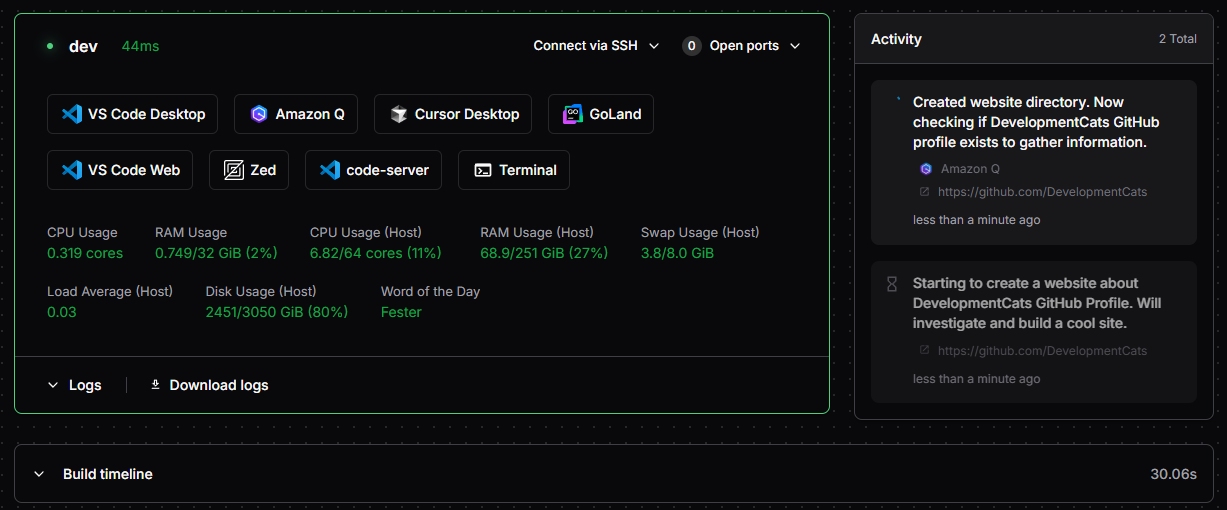
Run Amazon Q in your workspace to access Amazon's AI coding assistant. This module installs and launches Amazon Q, with support for background operation, task reporting, and custom pre/post install scripts.
module "amazon-q" {
  source   = "registry.coder.com/coder/amazon-q/coder"
  version  = "1.1.0"
  agent_id = coder_agent.example.id
  # Required: see below for how to generate
  experiment_auth_tarball = var.amazon_q_auth_tarball
}
Prerequisites
- You must generate an authenticated Amazon Q tarball on another machine:
Paste the result into thecd ~/.local/share/amazon-q && tar -c . | zstd | base64 -w 0experiment_auth_tarballvariable. - To run in the background, your workspace must have
screenortmuxinstalled.
How to generate the Amazon Q auth tarball (step-by-step)
1. Install and authenticate Amazon Q on your local machine:
- Download and install Amazon Q from the official site.
- Run
q loginand complete the authentication process in your terminal.
2. Locate your Amazon Q config directory:
- The config is typically stored at
~/.local/share/amazon-q.
3. Generate the tarball:
- Run the following command in your terminal:
cd ~/.local/share/amazon-q
tar -c . | zstd | base64 -w 0
4. Copy the output:
- The command will output a long string. Copy this entire string.
5. Paste into your Terraform variable:
- Assign the string to the
experiment_auth_tarballvariable in your Terraform configuration, for example:variable "amazon_q_auth_tarball" { type = string default = "PASTE_LONG_STRING_HERE" }
Note:
- You must re-generate the tarball if you log out or re-authenticate Amazon Q on your local machine.
- This process is required for each user who wants to use Amazon Q in their workspace.
Examples
Run Amazon Q in the background with tmux
module "amazon-q" {
  source                  = "registry.coder.com/coder/amazon-q/coder"
  version                 = "1.1.0"
  agent_id                = coder_agent.example.id
  experiment_auth_tarball = var.amazon_q_auth_tarball
  experiment_use_tmux     = true
}
Enable task reporting (experimental)
module "amazon-q" {
  source                  = "registry.coder.com/coder/amazon-q/coder"
  version                 = "1.1.0"
  agent_id                = coder_agent.example.id
  experiment_auth_tarball = var.amazon_q_auth_tarball
  experiment_report_tasks = true
}
Run custom scripts before/after install
module "amazon-q" {
  source                         = "registry.coder.com/coder/amazon-q/coder"
  version                        = "1.1.0"
  agent_id                       = coder_agent.example.id
  experiment_auth_tarball        = var.amazon_q_auth_tarball
  experiment_pre_install_script  = "echo Pre-install!"
  experiment_post_install_script = "echo Post-install!"
}
Notes
- Only one of
experiment_use_screenorexperiment_use_tmuxcan be true at a time. - If neither is set, Amazon Q runs in the foreground.
- For more details, see the main.tf source.