 2b0dba4ed1
## Description

<!-- Briefly describe what this PR does and why -->

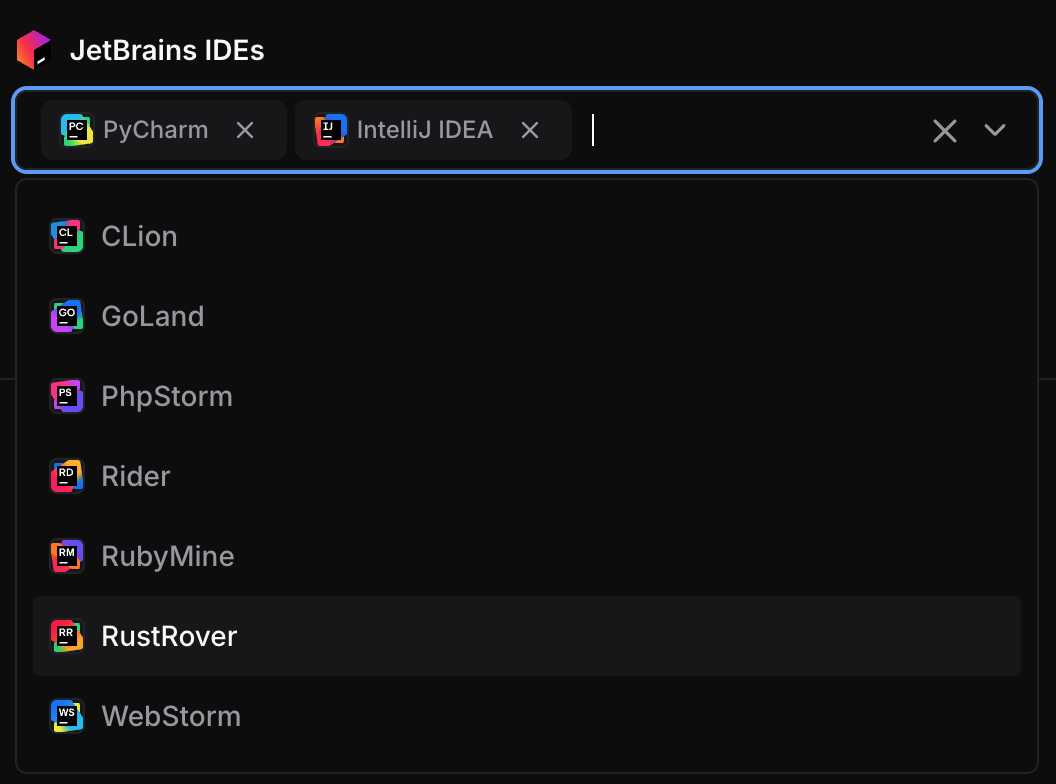
This PR adds a description field to the `jetbrains_ides`
`coder_parameter`.

This allows the JetBrains IDEs parameter to display a helpful
description in both the Coder UI and the CLI, improving clarity for
users when selecting which IDEs to configure in a workspace.

<img width="1102" height="252" alt="Screenshot 2025-08-07 at 11 04 13"
src="https://github.com/user-attachments/assets/90c78088-700a-4152-8a16-4b8c88c52e2c"
/>

## Type of Change

- [ ] New module
- [ ] Bug fix
- [x] Feature/enhancement
- [ ] Documentation
- [ ] Other

## Testing & Validation

- [x] Tests pass (`bun test`)
- [x] Code formatted (`bun run fmt`)
- [x] Changes tested locally

## Related Issues

https://github.com/coder/coder/issues/19145
| display_name | description | icon | verified | tags | |||
|---|---|---|---|---|---|---|---|
| JetBrains Toolbox | Add JetBrains IDE integrations to your Coder workspaces with configurable options. | ../../../../.icons/jetbrains.svg | true |
|
JetBrains IDEs
This module adds JetBrains IDE buttons to launch IDEs directly from the dashboard by integrating with the JetBrains Toolbox.
module "jetbrains" {
  count    = data.coder_workspace.me.start_count
  source   = "registry.coder.com/coder/jetbrains/coder"
  version  = "1.0.2"
  agent_id = coder_agent.example.id
  folder   = "/home/coder/project"
}
Important
This module requires Coder version 2.24+ and JetBrains Toolbox version 2.7 or higher.
Warning
JetBrains recommends a minimum of 4 CPU cores and 8GB of RAM. Consult the JetBrains documentation to confirm other system requirements.
Examples
Pre-configured Mode (Direct App Creation)
When default contains IDE codes, those IDEs are created directly without user selection:
module "jetbrains" {
  count    = data.coder_workspace.me.start_count
  source   = "registry.coder.com/coder/jetbrains/coder"
  version  = "1.0.2"
  agent_id = coder_agent.example.id
  folder   = "/home/coder/project"
  default  = ["PY", "IU"] # Pre-configure GoLand and IntelliJ IDEA
}
User Choice with Limited Options
module "jetbrains" {
  count    = data.coder_workspace.me.start_count
  source   = "registry.coder.com/coder/jetbrains/coder"
  version  = "1.0.2"
  agent_id = coder_agent.example.id
  folder   = "/home/coder/project"
  # Show parameter with limited options
  options = ["IU", "PY"] # Only these IDEs are available for selection
}
Early Access Preview (EAP) Versions
module "jetbrains" {
  count         = data.coder_workspace.me.start_count
  source        = "registry.coder.com/coder/jetbrains/coder"
  version       = "1.0.2"
  agent_id      = coder_agent.example.id
  folder        = "/home/coder/project"
  default       = ["IU", "PY"]
  channel       = "eap"    # Use Early Access Preview versions
  major_version = "2025.2" # Specific major version
}
Custom IDE Configuration
module "jetbrains" {
  count    = data.coder_workspace.me.start_count
  source   = "registry.coder.com/coder/jetbrains/coder"
  version  = "1.0.2"
  agent_id = coder_agent.example.id
  folder   = "/workspace/project"

  # Custom IDE metadata (display names and icons)
  ide_config = {
    "IU" = {
      name  = "IntelliJ IDEA"
      icon  = "/custom/icons/intellij.svg"
      build = "251.26927.53"
    }
    "PY" = {
      name  = "PyCharm"
      icon  = "/custom/icons/pycharm.svg"
      build = "251.23774.211"
    }
  }
}
Single IDE for Specific Use Case
module "jetbrains_pycharm" {
  count    = data.coder_workspace.me.start_count
  source   = "registry.coder.com/coder/jetbrains/coder"
  version  = "1.0.2"
  agent_id = coder_agent.example.id
  folder   = "/workspace/project"

  default = ["PY"] # Only PyCharm

  # Specific version for consistency
  major_version = "2025.1"
  channel       = "release"
}
Behavior
Parameter vs Direct Apps
default = [](empty): Creates acoder_parameterallowing users to select IDEs fromoptionsdefaultwith values: Skips parameter and directly createscoder_appresources for the specified IDEs
Version Resolution
- Build numbers are fetched from the JetBrains API for the latest compatible versions when internet access is available
- If the API is unreachable (air-gapped environments), the module automatically falls back to build numbers from
ide_config major_versionandchannelcontrol which API endpoint is queried (when API access is available)
Supported IDEs
All JetBrains IDEs with remote development capabilities: